June 21, 2026
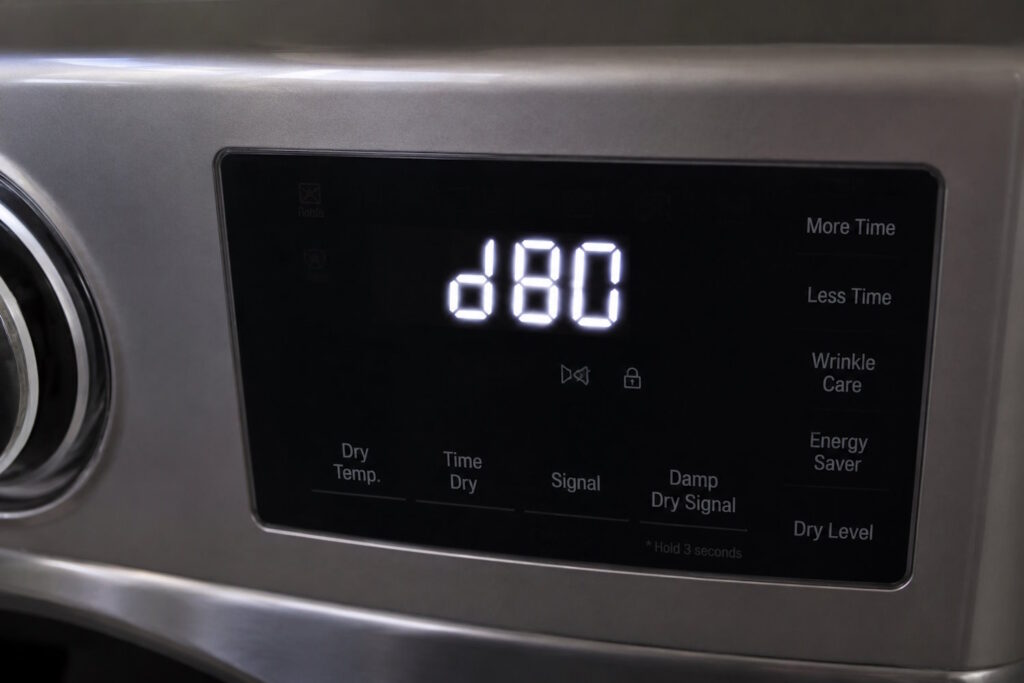
If you’ve recently found yourself searching for “d80 code on my LG dryer” or “LG dryer code d80,” you’re not alone. This is one of the most common questions homeowners ask when their dryer suddenly displays an unfamiliar error message.
The good news? In most cases, the LG dryer D80 code is not a dryer failure. Instead, it’s your appliance warning you about a potentially serious airflow problem within your dryer vent system.
Understanding what this code means can help you avoid longer drying times, higher energy bills, unnecessary repairs, and even the risk of a dryer fire.
What Does the LG Dryer D80 Code Mean?
The LG dryer D80 code is part of LG’s Flow Sense™ diagnostic system. When this warning appears, the dryer has detected a significant restriction in airflow through the exhaust vent system. According to LG, the D80 code typically indicates approximately 80% airflow blockage within the venting system.
In simple terms, your dryer is telling you that hot, moist air cannot properly escape your home.
When airflow becomes restricted, the dryer must work harder and longer to dry clothing, creating additional heat and stress on the appliance. This can lead to poor performance and increase the risk of overheating.
Why Does the D80 Code Appear?
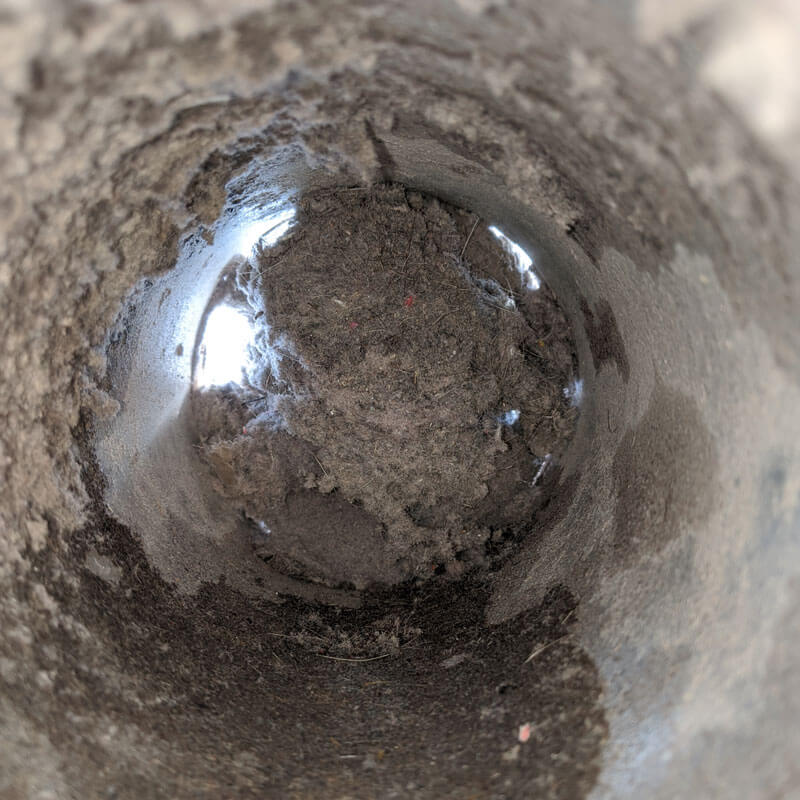
In most homes, the D80 code appears because lint has accumulated somewhere within the dryer vent system.
Common causes include:
- Lint buildup inside the dryer vent
- A clogged exterior vent hood
- Crushed or kinked vent tubing
- Excessively long vent runs
- Multiple bends or turns in the ductwork
- Bird nests or debris blocking the outside vent
- Improperly installed vent systems
Even homeowners who clean their lint trap after every load can still experience vent blockages. The lint screen only catches a portion of the lint generated during drying cycles. Over time, the remaining particles accumulate throughout the vent system and restrict airflow.
Signs Your Dryer Vent May Be Clogged
Often, the D80 code is not the first warning sign.
Many homeowners notice symptoms weeks or months before the error appears, including:
Clothes Taking Longer to Dry
If a load that once dried in 40 minutes now takes 60-90 minutes, restricted airflow is often the culprit.
The Laundry Room Feels Hot or Humid
When exhaust air cannot properly exit the home, heat and moisture may build up indoors.
The Dryer Feels Extremely Hot
Restricted vents force the appliance to work harder, causing excessive heat buildup.
Burning Odors
A burning smell can indicate lint accumulation near heating elements or within the vent system.
Excessive Lint Around the Dryer
Lint collecting behind or around the appliance may signal an airflow issue.
If you’re seeing any of these symptoms along with an LG dryer D80 code, it’s time to inspect the venting system.
What Should You Do When the D80 Code Appears?
If you see the D80 code on your LG dryer, start with these steps:
Clean the Lint Filter
Remove any visible lint from the screen before every load.
Check the Exterior Vent Hood
Go outside while the dryer is running and verify that air is flowing freely from the vent termination.
Inspect the Vent Hose
Pull the dryer away from the wall and check for crushed, kinked, or disconnected ductwork.
Reset the Dryer
After addressing any obvious airflow issues, unplug the dryer for several minutes and restart it. LG notes that a reset may clear the warning once airflow problems have been resolved.
Schedule Professional Dryer Vent Cleaning
If the code returns—or if you cannot access the entire vent run—a professional dryer vent cleaning is usually the safest and most effective solution.
How to Prevent the LG Dryer D80 Code
The best way to avoid future airflow warnings is through routine dryer vent maintenance.
Here are a few simple preventative measures:
- Clean the lint filter after every load
- Inspect the exterior vent hood several times per year
- Keep the area behind the dryer free from dust and debris
- Avoid crushing vent hoses when moving the dryer
- Replace outdated plastic or foil vent tubing with rigid metal ductwork
- Schedule professional dryer vent cleaning annually
Homes with large families, pets, or frequent laundry use may benefit from more frequent cleanings.
Why Professional Dryer Vent Cleaning Matters
Many homeowners assume they can completely clean their dryer vent using a store-bought brush kit. While these tools can help with minor buildup, they often cannot reach the entire vent system—especially in longer runs, multi-story homes, or complex duct configurations.
Professional dryer vent cleaning equipment is designed to remove lint, debris, and obstructions throughout the entire vent line, restoring proper airflow and helping your dryer operate safely and efficiently.
A professional cleaning can also:
- Reduce drying times
- Lower energy consumption
- Extend dryer lifespan
- Improve dryer performance
- Help reduce fire hazards caused by lint buildup
Don’t Ignore an LG Dryer D80 Code
If you’ve been wondering, “What does the D80 code on my LG dryer mean?” the answer is simple: your dryer is warning you that airflow is restricted and attention is needed.
While some minor issues can be resolved with basic troubleshooting, recurring D80 warnings often point to lint buildup deep within the dryer vent system.
At Dryer Vent Cleaners of Connecticut, we help homeowners throughout Connecticut remove dangerous lint buildup, restore proper airflow, and keep their dryers operating safely and efficiently.
If your LG dryer is displaying a D80 error code, don’t wait for drying performance to get worse. Contact Dryer Vent Cleaners of Connecticut today to schedule a professional dryer vent inspection and cleaning.